Another post in German: Vom 14. bis 15. August findet in Bern das deutschsprachige Opencast Community Treffen statt. Untenstehend findet ihr Informationen zum Programm. Eine Beschreibung des Veranstaltungsorts, sowie Unterkünfte und Wegbeschreibungen findet ihr in der Ankündigung der Veranstaltung.
ANMELDUNG
Die Teilnahme an der Veranstaltung ist kostenlos inkl. Pausenverpflegung. Wir freuen uns über eure Anmeldung bis 31. Juli 2023: Anmeldeformular
PROGRAMM: UNCONFERENCE
Das diesjährige Meeting wird in Form einer «Unconference» organisiert. Starten werden wir mit einem 2-3 stündigen Block mit Lightning-Talks, in welchen in 10-20 minütigen Referaten ein Thema vorgestellt werden kann, das damit ggf. auch für eine intensivere Erörterung vorgeschlagen wird.
Integraler Bestandteil davon wird ein etwa 45-60 minütiger Slot sein, in der jede der anwesenden Institutionen in maximal 5 Minuten über den aktuellen Zustand ihres Opencast, ein anstehendes/laufendes Projekt, ein aktuelles Problem oder ähnliches berichten kann (weitere Informationen folgen nach Ablauf der Anmeldefrist).
Anschliessend werden wir die Agenda gemeinsam erstellen, weitere Themenvorschläge sind möglich.
EINREICHUNG VON THEMEN & LIGHTNING-TALKS
Wir bitten alle angemeldeten Personen, bereits vor der Konferenz eigene Lightning-Talks (Titel, Dauer, Abstract max. 200 Wörter) und Themen für die Unconference (Titel & kurze Erläuterung, max. 200 Wörter) per Mail an david.graf@unibe.ch einzureichen. Deadline: 7. August 2023
ECKPUNKTE ZUM PROGRAMM
Start: Mo, 14.8.2023, 9:00 Uhr
Ende: Di, 15.8.2023, 17:00
Für alle, die bereits am Sonntag anreisen, werden wir rechtzeitig einen Treffpunkt für ein informelles Get Together am Abend vor der Veranstaltung ankündigen.
Am Montag gibt es (natürlich) eine Stadtführung… Details folgen.
Please make sure to read and follow the upgrade guide carefully when upgrading from an older major version to Opencast 14.
RPM and Debian packages as well as Docker images will be available soon. Watch for announcements on the users list.
To all committers and involved contributors, thank you for all your work. This could not have happened without you, and we are glad we were able to work together and get this release out.
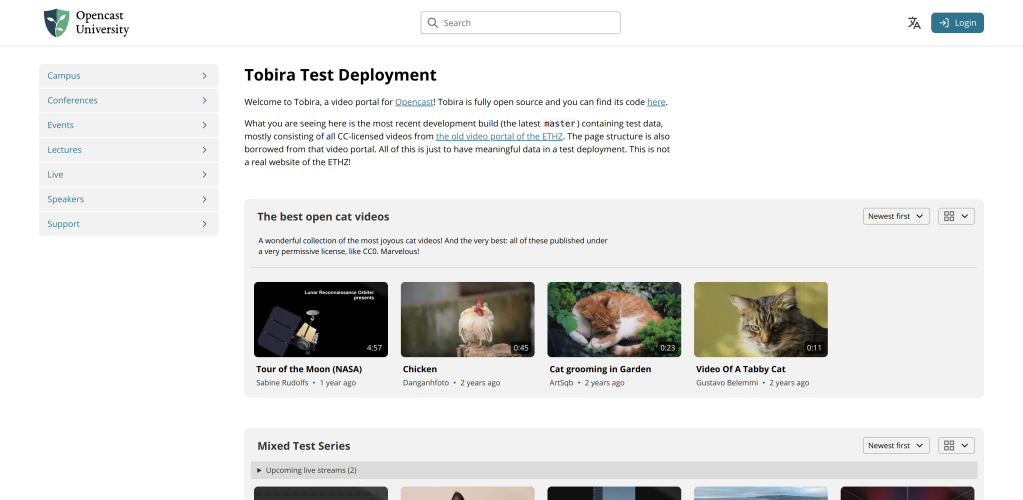
We are very happy to announce Tobira 2.0, the first major version after Tobira’s initial release in July last year. A lot has happened since then!
Tobira aims to be a pleasant interface through which users interact with your Opencast content. It lets you present videos and series in a customizable, hierarchical page structure, but also makes it easy for users to search through all media. Additionally, it offers tools to upload and manage videos. It’s possible to connect Tobira to virtually any authentication system and integrate it into your university’s/organization’s infrastructure.
The main changes in the 2.0 release include an extensive design refinement, user pages, being able to upload videos into series, a better share menu, a revamped color system, and a large number of accessibility improvements. User pages allow users (who are allowed to) to create and manage their own pages that are independent of the main page structure. The design changes don’t include anything major and the layout certainly stayed the same, but everything looks a lot tidier now.
But there are 7 additional releases between 2.0 and 1.0, which brought a large number of features and improvements as well. The most notable ones are:
Properly support live-streams
Make videos nicely embeddable
Add subtitles support
Vastly improve documentation
Add metrics endpoint (e.g. for Prometheus)
Improved series & event block editor
Pre-authenticating users for Studio and Editor
Collapse/hide multiple upcoming events
Ease first-time setup considerably
And much much more!
And there are no signs of development slowing down!
As usual, we would like to thank all institutions which make Tobira possible by funding its development. This is primarily the ETH Zürich which is the project’s primary patron and has been from the very start. We are also very grateful for the significant contributions by Bern university and the TU Wien.
The following article is in German, as it is about the German-speaking community meeting in Bern.
Vom 14. bis 15. August findet in Bern das deutschsprachige Opencast Community Treffen statt. Die Teilnahme an der Veranstaltung ist kostenlos inkl. Pausenverpflegung. Wir freuen uns über eure Anmeldung bis 31. Juli 2023. Bitte beachtet, dass wir am Montag früh beginnen und daher eine Anreise am Sonntag angezeigt ist – auch wegen des informellen Treffens am Abend…
Ort
Die Konferenz findet auf dem Areal der Unitobler im Hörraum F022 und den Seminarräumen am Lerchenweg 36 statt (Arealplan Unitobler).
Bus
Die Unitobler ist mit der Linie 20 (ab Bern Bahnhof oder Bern Schanzenstrasse) von den Bushaltestellen Mittelstrasse oder Unitobler zu erreichen.
Auto
Rund um das Areal der Unitobler sind nur gebührenpflichtige Parkplätze mit beschränkter Parkzeit (blaue Zone) vorhanden. Wir empfehlen deshalb dringend, eine Parkmöglichkeit mit der Übernachtungsunterkunft abzusprechen.
PubliBike
An unterschiedlichen Standorten (Karte PubliBike) können Fahrräder oder E-Bikes gemietet werden.
E-Scooter
In der Stadt Bern sind Leihroller von Tier verfügbar. Bitte beachtet das Parkverbot für einzelne Strassen in der App.
Programm
Das vorläufige Programm zur Veranstaltung findet ihr hier in der separaten Ankündigung (folgt später).
UNTERKUNFT
Alle vorgeschlagenen Unterkünfte sind in der Nähe des Hauptbahnhofs und maximal 20 Minuten zu Fuss von der Unitobler entfernt. Wir haben kein Hotelkontingent reserviert. Wir empfehlen eine frühzeitige Buchung. Die Hotels sind grob nach dem zu erwartenden Preisniveau sortiert.
You heard it first at the Opencast summit in Berlin, so it comes as no suprise that commercial lecture capture solutions are becoming a financial burden to universities, especially in the aftermath of the pandemic explosion of video content. What is a surprise is the fact that Opencast receives an honourable mention in the respective article from streamingmedia.com, being described as “the venerable and well-maintained Opencast (née Opencast Matterhorn) open source video platform”. Blush.
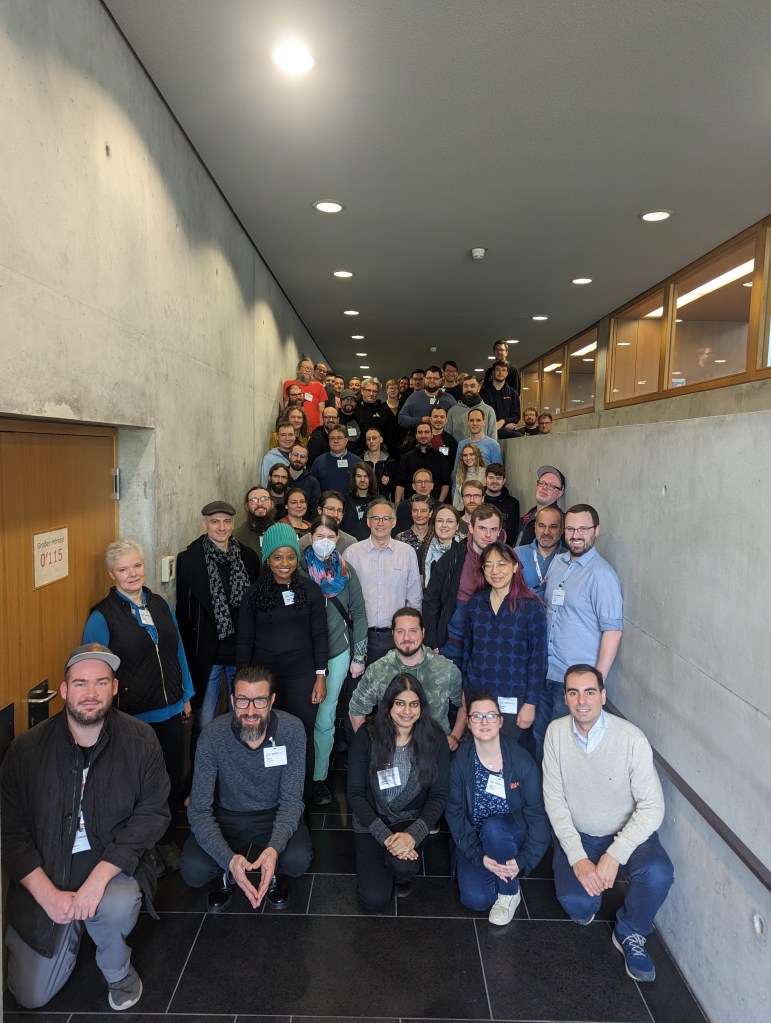
After a three-year hiatus, the Opencast community was finally able to come together in person for their annual summit at Humboldt-Universität zu Berlin in March. More than 60 people joined, the programme was packed and the backlog for informal communication was reduced, but not resolved. Next stop: Bern in August for the German-speaking community. Go to https://video.ethz.ch/events/opencast/2023/berlin.html for recordings.
With user registration finally in place, the long-lasting discussion about the usage and relevance of Opencast in the “lecture capture market” won’t end. Correspondingly, the survey the German association of higher education IT centers launched (German only) does not represent the usage in German (speaking) universities with 72 responses from 250 members (and more than 400 universities overall). But it’s nice to see it shows Opencast as market leader in HE…
We don’t have any hotel deals or did make any reservations for the conference. Berlin has a wide variety of accommodations. Take your pick.
While there are accommodations in near the conference venue in Adlershof, we recommend choosing something near city center instead since the evening events will all be around that area.
A good choice for a ticket is the AB Berlin WelcomeCard 72h. If you stay longer, the AB 7-day card may be worthwhile. To get from Adlershof to the city center or vice versa, an AB ticket is sufficient.
However, to get from BER (the big Berlin airport) to the city (to Adlershof or the center) you need an ABC ticket.
For orientation, planning or to buy the digital tickets, you can use the websites of the BVG or the VBB or their Apps.
From Wednesday, March 22nd to 24th the Opencast Summit will take place in Berlin. Here you can find the preliminary program. A description of the venue, accommodation, and directions can be found in the announcement of the event.
Participant registration is still open and closes on 17th of March 2023. You can register here.
For those arriving on Tuesday, we will announce a meeting point for an informal get together in the evening before the event.
Revisited: What’s next in lecture recording and video management (1h) – Olaf Schulte
14:00
Annotation Tool State of the Union (30′) – Julian Kniephoff
14:30
Opencast User Statistics (15′)
14:45
D/A/CH Community Meeting (1h)
Main Track
Developer Track
09:30
Developer Tutorial (90′) – Greg Logan
11:00
Coffee break (15′)
Developer Track
Abstracts
Wednesday, March 22
Opencast 12 and 13 releases: Overview of new releases in the last year.
Opencast 2023 Roadmap: Roadmap what is going to be new in Opencast in 2023.
Upgrading Manchester from Opencast 3.x to 12.x: An update on progress to upgrade our huge deployment from Opencast 3.x to 12.x. Covid delayed our plans to move to AWS and then to update, we are finally trying to catchup!
Tobira: recent developments and future plans: The bi-annual update on the video portal Tobira! What happened in the past year and what are our plans for 2023?
Tobira in the real world: experiences, use cases and plans: Short reports from different universities on how they use Tobira or plan to use it.
Opencast Studio: recent accessibility improvements and other developments: A quick update of recent developments and future plans.
How to install Tobira: On brief demonstration on how to install Tobira on a server, connect it to Opencast and configure it.
Community talk about Tobira: We will talk about everything Tobira. What are high priority changes? Where would the community like Tobira to go? What are reasons it’s not yet used at _your_ institution? Community feedback regarding specific open questions.
Manchester’s Next Gen Capture Agent (WIP!): Current work in progress with our next generation of Capture Agent hardware/software and management
CAs in a huge new building: Lessons from rolling out CAs in a new build with ~100 teaching rooms
Evaluation of an FPGA Accelerator Card for transcoding: For my bachelor thesis I used a Xilinx FPGA accelerator card and tested the efficiency of this solution compared to CPU transcoding. I will present the results in this talk.
Extron LinkLicense & Capture Agent API: Together with Greg, Rüdiger, and Lars, I would like to discuss plans to work towards an enhanced CA API which is likely to become a LinkLicense by Extron
Job Dispatching: Opencast’s workflow and job dispatcher systems are the complex, vital core of your install without which Opencast does not really do anything. Do you know how they work? Come learn exactly how the sausage is made, and understand why Opencast’s job dispatching can be so slow. Targetted for all Opencast adopters, regardless of technical skill. Author Note: This is a repeat of a talk from Vienna (2018).
How to debug in Opencast and setup your environment: Presentation to show how you can debug in opencast and what tools are available, also, how to setup the IDE for this task
How to integrate? An overview of Opencast’s APIs: This talk gives an overview of Opencast’s APIs. It can function as a starting point for adopters who want to implement a custom integration.
How to integrate with Moodle? A showcase of various integration scenarios.
Thursday, March 23
New Opencast LMS integration for Stud.IP with Stud.IP User Provider: The Stud.IP Opencast Plugin has been completely overhauled, facilitating the new Stud.IP User Provider from OC 12.8 and upwards. In this short presentation, light will be shed on the new features of the integration and the technical backgrounds.
ILIAS-Opencast-Plugin: Current state of the plugin, new features and releases. Upcoming features and improvements. Could also be 30min presentation. I’d rather move more general LMS-specific discussions in their own time slot
New Integration in BigBlueButton 2.6: …
Asynchronous Engagement: Seeding Video Comments with Zoom Chat: Live Zoom meetings often have an active Zoom Chat session that accompanies the Zoom meeting. Attendees post reactions, thoughts, and links into Zoom Chat in response to the live lecture. The Zoom Chat content of the Zoom live experience is lost to our asynchronous students who watch processed recording published through Opencast. We decided to start ingesting Zoom Chat along with the Zoom recording, for select courses, to bring the asynchronous student closer to the live experience of their peers. This lightening talk describes how the time coded Zoom Chat documents are retrieved and processed to synchronize with trimmed videos in Opencast, and how they are seen and engaged with by asynchronous users.
Vendors Showcase
Paella Player 7 in Opencast. What, when and how: After the launch of the fully-rewritten Paella player 7, the player is ready for its inclusion as the default player in Opencast (if the community wants to). In this talk I will present the updates carried out this year, especially those regarding accessibility and testing, and will provide an overview of the integration process
Proper player integration for third party tools: IMHO Opencast lacks a proper solution to integrate the paella player from opencast into third party tools (e.g. LMS). There should be a way to let a third party tool authorize/use the player without requiring user specific data/authentication. Currently third party tools like LMS plugins either use their own player, use LTI or roll with their own player like Tobira. In this session I would like to propose to discuss the future of those implementations and what a usable solution would look like. Obviously the title is a little bit mean and could/should be changed. I’m happy to explain this further if necessary.
Captions and Subtitles with Amberscript in Opencast: Explanation how to use Amberscript in Opencast and what you can do with it, as well as give an update on new features in the integration
Automatic language detection for transcription: Showing off how automatic language detection with Vosk work so that you don’t have to know in advance what language is spoken in the video.
Large-Scale Automatic Subtitling: Developments in the AI field have been quite rapid in the last several moths, with ChatGPT by OpenAI making headlines worldwide. OpenAI released a less famous, open-source, tool for automatic audio transcription (speech-to-text) and translation, called Whisper, for which there is already an Opencast integration. In this lightning talk I will be presenting our approach at TU Graz, which has two parallel tracks: 1. short-term large-scale deployment of automatic subtitling via an external partner; 2. internal instance of Whisper for R&D with focus on automatic subtitles for livestreams.
Alex helped us transcribe more than 40.000 hours of video recordings: In February 2023, Alex used Whisper OpenAI and within 24 hours transcribed more than 37.000 videos from our university videoportal (https://www.fau.tv). In this presentation we will show some interesting findings from our overall experience.
Generating subtitles for Opencast using OpenAI’s Whisper: Short insight into an API implemented with Python, which transcribes videos via OpenAI’s Whisper. In addition, introduction to the associated program to extract videos from Opencast and transcribe them automatically, recognize languages, etc.
Automatic processing of diverse video sources: Automatic adaptive editing and transcoding
Automatic subtitling using Whisper AI: Last year, Open AI released Whisper AI, a Free Open Source AI that can make audio transcriptions in more than 20 languages. This presentation will show how to implement and use it in opencast.
Opencast Architecture and Services: Opencast is a complex beast, do you know how it works? What is a service, and how does that relate to this jar file? What’s the difference between an admin and a worker profile? How do the services find each other and schedule jobs? If you’ve ever wondered something along those lines, this is the talk for you. Targetted for all Opencast adopters, regardless of technical skill. Author Note: This is a repeat of a talk from Vienna (2018).
Beyond NVENC – Alternatives on HW encoding: In this talk, I will look into other HW acceleration technologies for video processing, in specific Apple M1 and intel Quicksync, Advantages and disadvantages
Dissecting a Video File: Have you ever wondered what’s inside an mp4 file? How come you can play some video files, but not others? What even is video and audio data? How is it compressed to a fraction of its original size, often without a noticeable loss in quality? In this talk I will try to answer these and other questions in order to explore the technologies without which Opencast could not exist.
Opencast full API integration with corporate LMS/CMS: Since June 2022, in the IT Service of the University of Alicante, we are integrating Opencast as back-end solution and encoding engine for our multimedia CMS replacing our old system based on Visual Basic, Visual C++, FFMPEG and Avisynth. As we want to keep our front-end (Vértice), this integration its being done entirely through the Opencast API and final users will not be aware of this replacement. For us ut is a big step as Opencast will process not only VoD stuff but also materials generated LIVE from our University classrooms, auditoriums, etc. In this presentation we would like to share the details of this integration. The steps that we have taken, difficulties, security aspects, phases of the project and future developments. Maybe, there are other institutions that could benefit from this initiative.
Writing Unit Tests: Opencast is a modular system with lots of interplay between modules – and testing that effectively can be really hard! In this talk we will go through, with concrete examples how to create good tests for Opencast. We will be covering what mocks are, what the differences between the types is, and how to properly define and verify their behaviour. We will also cover some basic strategies for debugging your mocks when things inevitably go wrong. Talk is targetted towards Opencast developers.
Friday, March 24
Release managers are the best❗️: I’ll talk about what release managers have to do and why you should become one.
Annotation Tool State of the Union: What is happening with the Opencast Annotation Tool? Find out about the latest developments and the overall state of the project.
Tracking the blackboard?: I will report on what scenarios we invest in at ETH Zürich to record lecturers and/or blackboards, which technologies we abandon, looking for in put from others.
Opencast User Statistics: What possibilities are there in Opencast to collect user statistics? What are the pros/cons of the different methods? What technologies are behind these methods and how are they implemented? What experiences have other institutions made with these methods?
World Cafe: Discussing issues in small table groups.
Future of the Opencast Editor and Opencast Player: Discussion
Revisited: What’s next in lecture recording and video management: Discussion
D/A/CH Community Meeting: Discussion in German language
Developer Tutorial: In this talk I will be going through how to do day-to-day Opencast development. We will briefly cover some system environment setup (dependencies, selection of IDE) before moving on to development. The development section includes selecting which branch to work against when starting a patch, how to commit with good hygiene and messages, and what is expected when filing issues and pull requests. Expect to see some git magic (git rebase, git reflog) as well. Talk is targetted towards developers, whether Opencast or otherwise.


 Opencast